Kosár megtekintése
0
USD
USD
Products
Custom Dedicated Server
Pre-Built Dedicated Server
Netherlands Dedicated Server
10Gbps Server
Storage Servers
Managed VPS
VPS Hosting
Partnerek
Támogatás
Kapcsolat
-----
Hálózat állapota
Tudásbázis
Hírek
Bejelentkezés
How to Access Softaculous in cPanel?
Ügyfélkapu
Tudásbázis
Softaculous
How to Access Softaculous in cPanel?
Címkefelhő
affiliate
dmca ignored hosting
force ssl
How to Install a WordPress Theme
how to install cpanel
https://
no dmca hosting
offshore hosting
ssl
ssl certificate
Támogatás
Támogatási jegyek
Közlemények
Tudásbázis
Letöltések
Hálózat állapota
Új Támogatási Jegy
1.
Log into your cPanel account.
2.
In the "
Software
" section, click on "
Softaculous Apps Installer
" Icon.
3.
cPanel will open a Softaculous Interface.
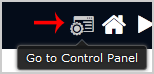
If you want to go back to cPanel, click on the "
Go Back to Control Panel
" icon.
Hasznosnak találta ezt a választ?
0 A felhasználók hasznosnak találták ezt (1 Szavazat)
Igen
Nem
Legnépszerűbb cikkek
What is Softaculous?
Softaculous is an Auto-Installer that allow automated installation of a script through a single...
Jelszó létrehozása
Adjon meg egy 8 és 64 közötti számot a jelszó hosszához
Jelszó hosszúság
Generált jelszó
Új jelszó generálása
Másolás